
See QMerse agents at work.

Agent workflows built on the visual canvas, from loading and analysing data to multi-agent orchestration. Each one states what goes in, what QMerse performs, where you review and what comes out, and its status: demo, pilot, customer deployment or concept.

Applications

Data · Demo

Daily Vehicle Market Monitor

A scheduled agent captures vehicle-market listings every day and stores a dated snapshot for analysis.

Status
Demo
Task & input
Public vehicle-market listings, collected every day on a cron schedule.
QMerse performs
Collects and flattens the listings in Python, writes them to PostgreSQL without duplicating rows, and maps activity by dealer ZIP.
You review
The run history, the dated snapshots and the ZIP map.
Output
A daily snapshot appended to a growing time series, with a map from the same run.

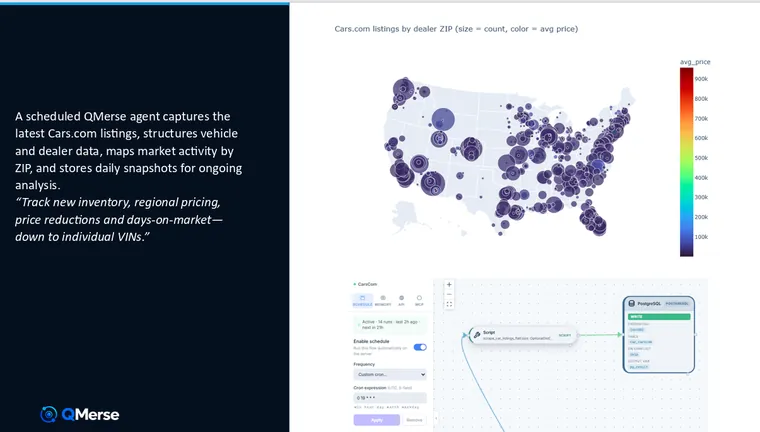
A scheduled QMerse agent captures public vehicle-market listings, structures vehicle and dealer data, maps market activity by ZIP code, and stores a daily snapshot for ongoing analysis. It runs on the server on a cron schedule — nobody opens the canvas to trigger it.

Track new inventory, regional pricing, price reductions and days-on-market — down to individual VINs.

How it is built. A Python script node handles collection and flattening, then writes straight into PostgreSQL. The write is configured to skip on conflict, so a re-run never duplicates rows and the table stays clean whether the flow fires once or fires again after a failure. The schedule is a standard cron expression, so the flow runs unattended and reports its own run history.

Why the schedule is the point. A single scrape is a snapshot; the value is in the accumulation. Because every run appends another dated snapshot, the dataset becomes a time series — and questions that are impossible against one download become straightforward: which ZIPs are discounting fastest, how long a given trim sits before it moves, where a specific VIN has been repriced.

The map shows listings by dealer ZIP, with bubble size as listing count and colour as average price. It is generated from the same workflow that collects the data, so the visualisation stays in step with the table behind it.
Analysis · Demo

Property Tax Protest Agent

Finds comparable homes, builds the statistical case and prepares the Texas protest form for you to review.

Status
Demo
Task & input
A Texas property, checked against property databases.
QMerse performs
Compares it with similar nearby homes, runs the statistics, maps the comparables and estimates a supported value.
You review
The evidence report and the prepared protest form, before you submit it yourself.
Output
An evidence report and a completed Texas protest form.

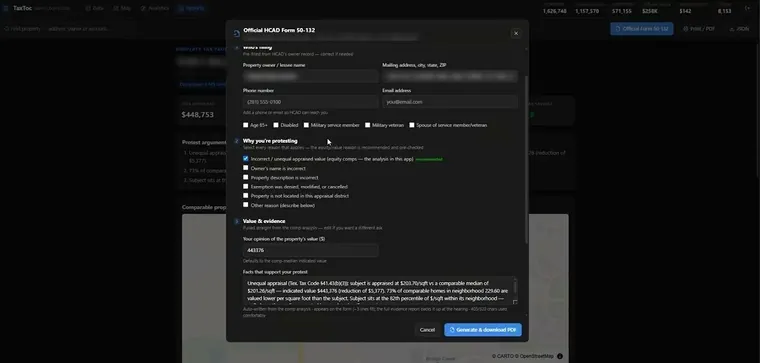
Could your Texas property be over-appraised compared with similar homes in your neighbourhood? This agent connects directly to property databases, analyses comparable homes, and helps a homeowner build an evidence-based tax protest.

End to end, it:

  • Compares your appraised value and price per square foot against similar nearby homes
  • Runs the mathematical and statistical analysis needed to detect over-appraisal
  • Identifies the most relevant comparable properties
  • Plots the subject property and its comparables on an interactive map
  • Estimates a supported value, the potential assessment reduction and the possible tax saving
  • Generates an evidence report with charts, maps and protest arguments
  • Prepares the official Texas protest form for you to review and submit

The last step is the one that matters. Most AI stops at analysis and leaves a person to do the paperwork. This carries it through to a completed, ready-to-submit form and an evidence pack — not a summary of what you could do next. You review it and file it yourself; that is the difference between something interesting and something a homeowner actually uses.

Behind the front end, agents designed and orchestrated in QMerse manage the whole chain: database queries, calculations, analytics, mapping and automated report generation. It is a good example of a data-intensive process that nobody enjoys, turned into an application that produces a clear, actionable result.

This demonstration is for informational purposes and does not constitute tax or legal advice. Any generated analysis or form should be reviewed before submission, and a successful protest or tax saving is not guaranteed.

Geospatial · Demo

AI Real Estate Agent

Ask in plain language: the agent queries the housing database, filters the results and moves the map.

Status
Demo
Task & input
A plain-language question about a Houston housing database.
QMerse performs
Interprets the request, queries and filters the database, and moves the interactive map.
You review
The results in the conversation and on the map.
Output
Filtered listings shown on an interactive property map.

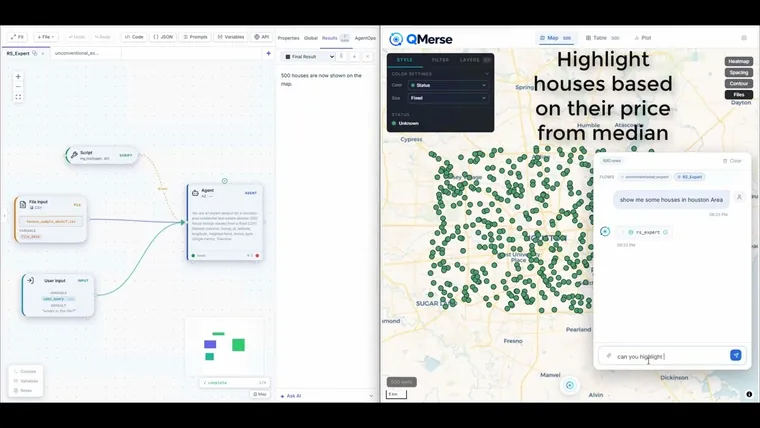
An agent connected to a Houston housing database, deployed as an application people can actually use. You ask in plain language — “Show me houses in the Houston area”, “Highlight homes priced below the median” — and the agent analyses the data, returns the results, and updates the interactive property map in real time.

The demo shows both halves at once. On the left is the QMerse visual workspace, where the agents, tools, data inputs and workflows are designed and orchestrated. On the right is the user-facing application: the conversational interface and the property map your end user actually touches. You can watch a request travel from the canvas that was built to the screen a customer is looking at.

What the agent coordinates behind that interface: understanding the request, querying the database, filtering the results, and controlling the map. Note the last one — the agent is not just returning rows for someone else to render. It is operating the application.

The pattern generalises well beyond property. Most organisations have a database that only two or three people know how to query, so the data is available in principle and unreachable in practice. This is the shape of the fix: an agent that can talk to a database, drive an application, and control a visual interface on the user’s behalf.

Geospatial · Demo

Critical Minerals Intelligence Agent

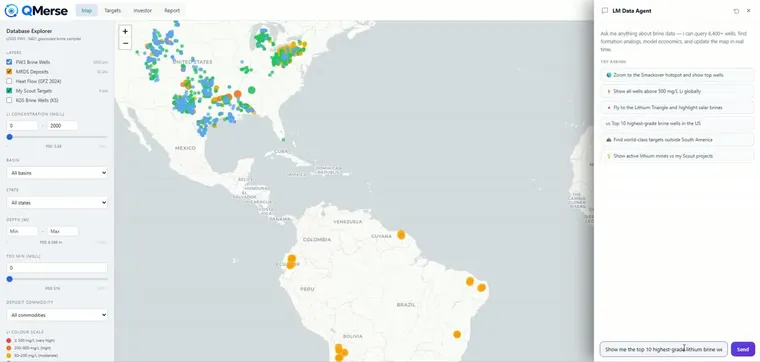
Ask for the top lithium brine wells: the agent queries geological databases, ranks them and drives the map.

Status
Demo
Task & input
A request to screen lithium brine wells and deposits across several geological databases.
QMerse performs
Queries the databases, compares concentration, depth and location, ranks the opportunities and drives the map.
You review
The ranked shortlist on the map, choosing which opportunities to keep.
Output
A structured report on the selected opportunities, for preliminary screening.

A critical-minerals intelligence application powered by agents designed and orchestrated on the QMerse canvas. It connects directly to multiple geological and mineral databases, and users talk to that data in plain language while the agent runs the analysis and takes actions inside the application.

What the agent does:

  • Searches and analyses lithium brine wells and mineral deposits
  • Identifies and ranks high-grade lithium opportunities
  • Compares concentration, depth, location and other technical attributes
  • Explores regions such as the United States and the South American Lithium Triangle
  • Combines information across several geological datasets at once
  • Filters, navigates and updates the interactive map automatically
  • Supports early-stage technical and commercial feasibility assessment
  • Saves selected opportunities and generates structured reports for investors

The front end is a real application — an interactive geospatial map, a database explorer and a conversational interface. Behind it, QMerse agents coordinate the database queries, the analytical tools, the map actions, the visualisation and the reporting. The agent does not just answer; it operates the application on your behalf.

This is what turns a complex geoscience dataset into a decision-support system that explorers, mining companies, investors and government bodies can all use — without each of them needing to know how to query it.

This application supports preliminary screening and decision-making. Its outputs do not constitute geological, financial or investment advice, and any opportunity should undergo independent technical and commercial due diligence.

Workflow patterns

Orchestration · Demo

Agent as Tool

Combine multiple expert agents into one answer by calling each as a tool.

Status
Demo
Task & input
A question that needs more than one kind of expertise.
QMerse performs
An orchestrator calls specialist agents as tools and merges their findings.
You review
Each specialist call, in the run log.
Output
A single recommendation.

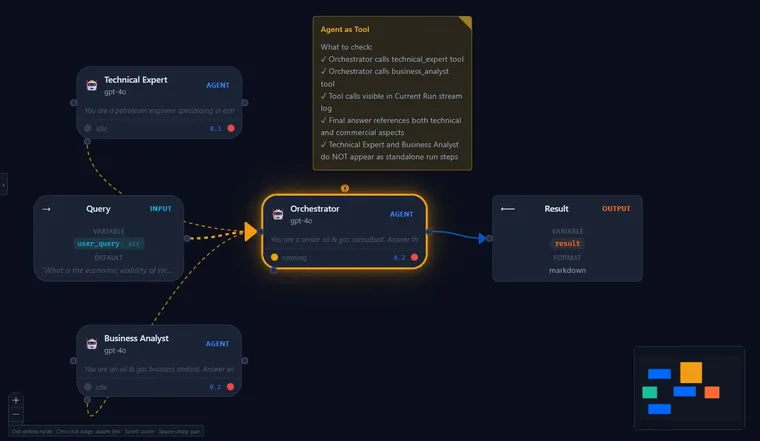
An orchestrator calls domain specialists as tools and synthesises their outputs into a single, traceable recommendation.

How it works: each specialist (in the recording, a Technical Expert and a Business Analyst) is invoked as a tool; the orchestrator merges their findings and every call is visible in the run log.

Flow: Query → Orchestrator → (Specialist A + Specialist B) → Result.

Analysis · Demo

Batch Topic Analyser

A list of topics in, one investment report out.

Status
Demo
Task & input
A list of up to 20 topics, and the context for the report.
QMerse performs
A loop runs an Item Analyst agent on each topic; a Context Framer sets the brief and a Report Writer merges the results.
You review
The per-topic analyses behind the report.
Output
One investment report.

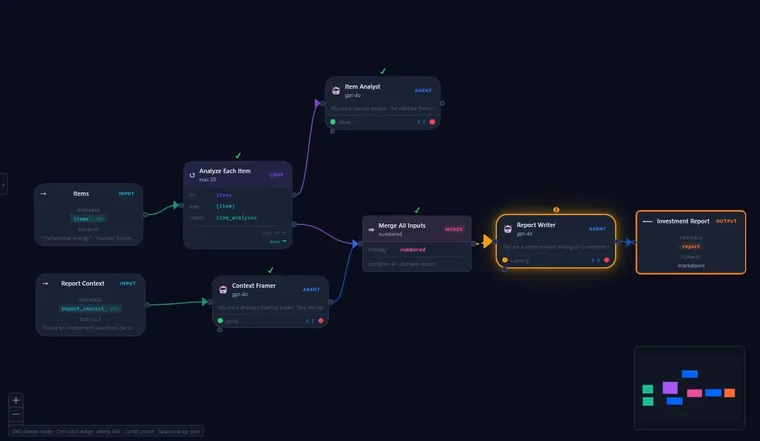
A loop works through a list of topics one at a time and hands back a single report.

How it works: a loop runs an Item Analyst agent over every topic in the list (up to 20), a Context Framer agent sets the brief, and a Report Writer agent merges both into one investment report.

Flow: Items → Loop (each item) → Item Analyst; Report context → Context Framer → Merge → Report Writer → Investment report.

Orchestration · Demo

Sub-Agent Routing

An orchestrator that routes each question to the right specialist sub-agent.

Status
Demo
Task & input
A question, with a CSV file where the question needs one.
QMerse performs
An orchestrator routes the question to the right specialist agent, such as a Weather Agent or a CSV Stat Agent.
You review
Which specialist was chosen, and its answer.
Output
The specialist’s answer.

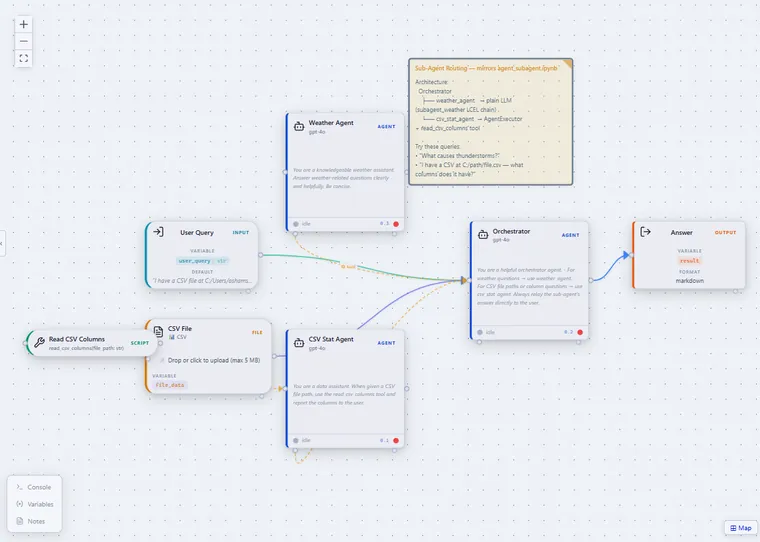
One orchestrator coordinates several specialist agents, choosing the right one for each request.

How it works: the Orchestrator treats specialists (for example a Weather Agent and a CSV Stat Agent) as callable sub-agents, routes the query, and relays the chosen specialist's answer.

Flow: User Query (+ CSV) → Orchestrator → { Weather Agent | CSV Stat Agent } → Answer.

Data · Demo

Data Loader Agent

Load data from CSV, PDF, or Excel — the agent picks the right reader automatically.

Status
Demo
Task & input
A request and a CSV, PDF or Excel file.
QMerse performs
A router checks the file type and a Data Loader Agent calls the matching reader tool.
You review
The loaded content, before it is analysed.
Output
The file’s content as clean markdown.

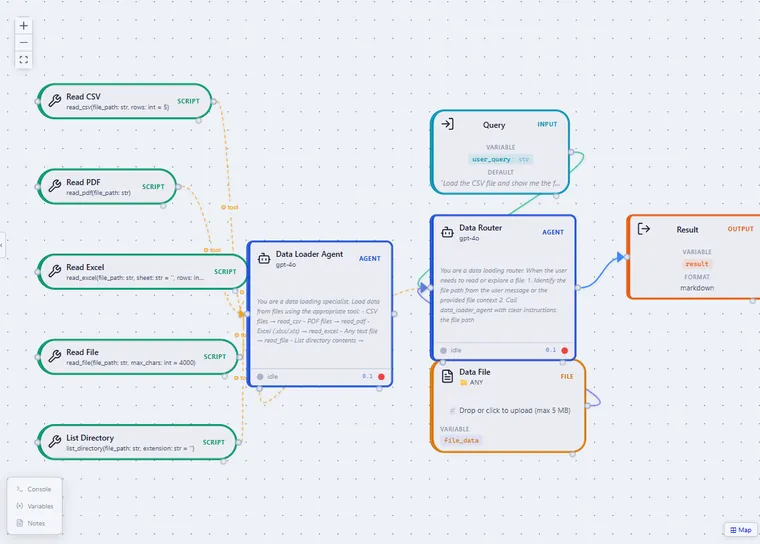
A data-loading router reads the user request and the uploaded file, then calls the matching tool to pull the content in.

How it works: the Data Router inspects the file path and type, then delegates to a Data Loader Agent equipped with read_csv, read_pdf, read_excel, read_file and list_directory tools — returning clean markdown.

Flow: Query + Data File → Data Router → Data Loader Agent → Result.

Analysis · Demo

EDA Agent

Automated exploratory analysis — stats, missing values, correlations, and profiling on a CSV dataset.

Status
Demo
Task & input
A question and a CSV file.
QMerse performs
Profiles the dataset: summary statistics, missing values, correlations and value counts.
You review
The written analysis and the statistics behind it.
Output
A written exploratory analysis.

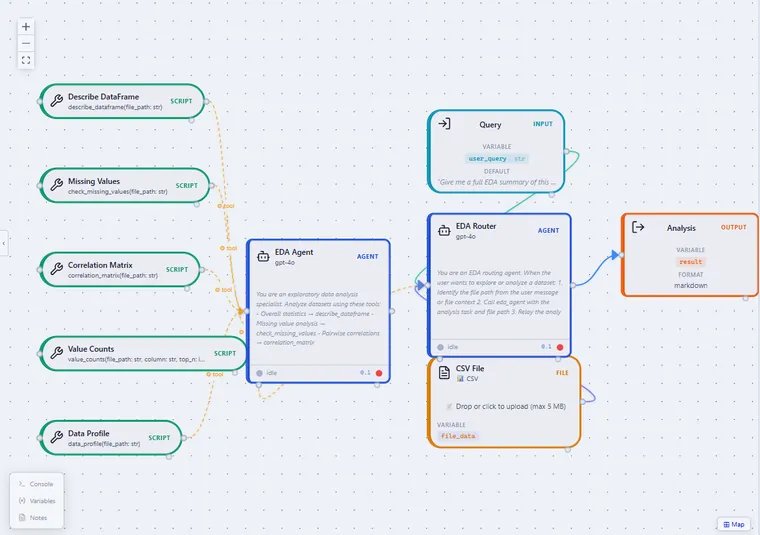
An exploratory-data-analysis specialist that profiles a dataset end to end and summarises what matters.

How it works: an EDA Router calls describe_dataframe, check_missing_values, correlation_matrix, value_counts and data_profile against the uploaded CSV, then relays a written analysis.

Flow: Query + CSV → EDA Router → EDA Agent → Analysis.

Analysis · Demo

Plotter Agent

Turn a dataset into the right chart from a plain-language request.

Status
Demo
Task & input
A question and a CSV file.
QMerse performs
Chooses the chart type and the columns, then calls the matching plotting tool.
You review
The chart, against the question asked.
Output
A chart.

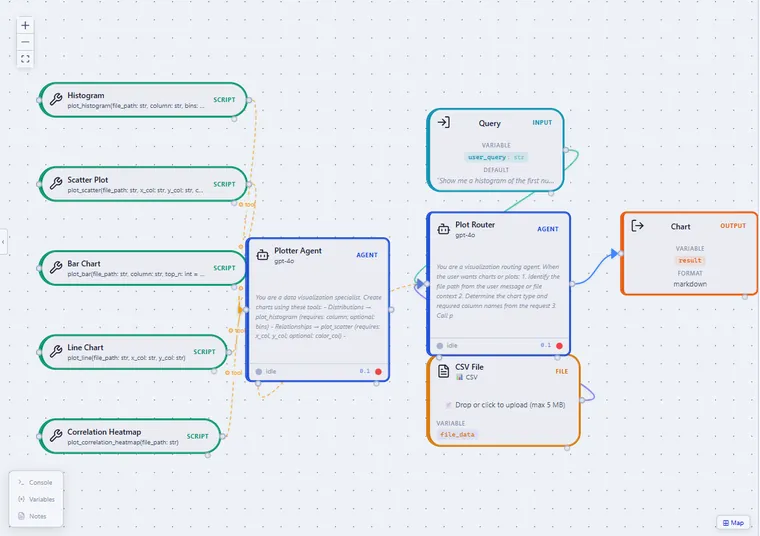
A visualization specialist that picks the appropriate chart and columns for the question being asked.

How it works: a Plot Router determines the chart type and required columns, then calls plot_histogram, plot_scatter, plot_bar, plot_line or plot_correlation_heatmap.

Flow: Query + CSV → Plot Router → Plotter Agent → Chart.

Data · Demo

File Reader with Skills

Read PDF, Excel, and Word files using built-in agent Skills — no tool nodes to wire.

Status
Demo
Task & input
A PDF, Excel or Word file, and a question about it.
QMerse performs
Extracts information from supported PDF, Excel and Word files with a File Reader agent and its pdf, xlsx and docx skills.
You review
The extracted answer against the source document, before it is used.
Output
The information you asked for, as a named result.

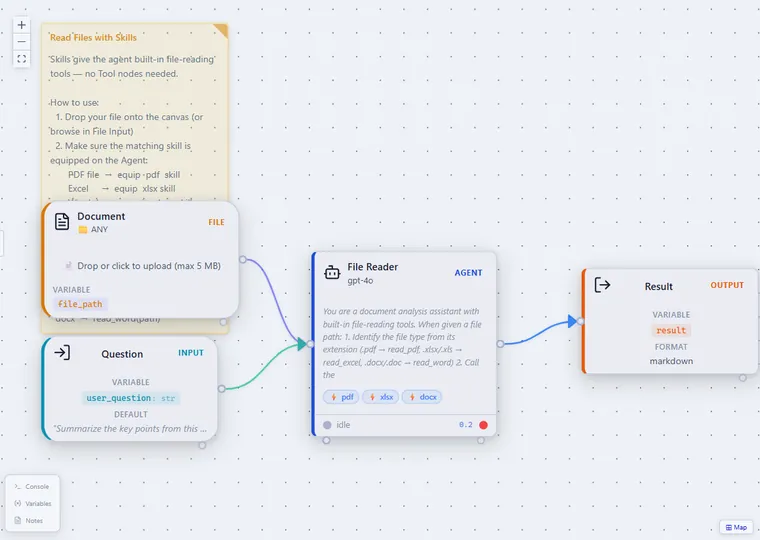
Skills give an agent built-in file-reading abilities, so you don't need to wire separate Tool nodes.

How it works: drop a document onto the canvas, equip the matching skill (pdf / xlsx / docx), and the File Reader agent detects the file type and extracts the content.

Flow: Document + Question → File Reader (pdf/xlsx/docx skills) → Result.

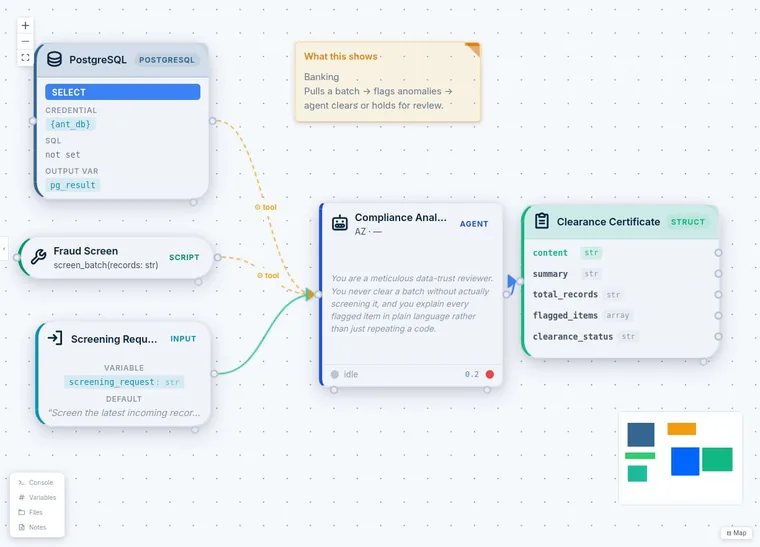
QMerse canvas: a PostgreSQL node and a Fraud Screen Python script are tools of a Compliance Analyst agent, which takes a screening request and returns a structured clearance certificate.
Analysis · Demo

Banking Batch Screening

Clear a batch or hold it for review: a compliance agent explains every flagged item.

Status
Demo
Task & input
A screening request and a batch of transactions from PostgreSQL.
QMerse performs
A Python fraud screen flags anomalies and a compliance agent explains each flagged item in plain language.
You review
The flagged items: the batch is cleared or held for review.
Output
A clearance certificate.

Clear a batch or hold it for review. A PostgreSQL query pulls the batch, a Python fraud screen flags anomalies, and a compliance agent explains every flagged item in plain language.

Flow: PostgreSQL + Fraud screen (tools) · Screening request → Compliance Analyst → Clearance certificate.

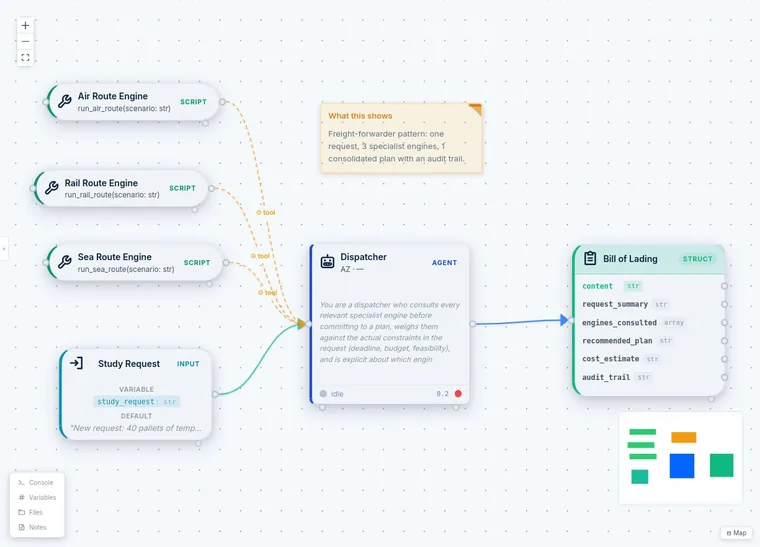
QMerse canvas: air, rail and sea route engines are Python tools of a Dispatcher agent, which takes a study request and returns a structured bill of lading with an audit trail.
Orchestration · Demo

Freight Dispatcher

One request, three route engines, one plan with an audit trail.

Status
Demo
Task & input
A study request with a deadline and a budget.
QMerse performs
Consults air, rail and sea route engines (Python tools) and weighs them against the deadline and budget.
You review
The audit trail behind the recommended plan.
Output
A consolidated plan, issued as a bill of lading.

One request, three engines, one plan. The dispatcher consults every relevant route engine, weighs them against the deadline and budget, and returns a consolidated plan with an audit trail.

Flow: Air, rail and sea route engines (tools) · Study request → Dispatcher → Bill of lading.

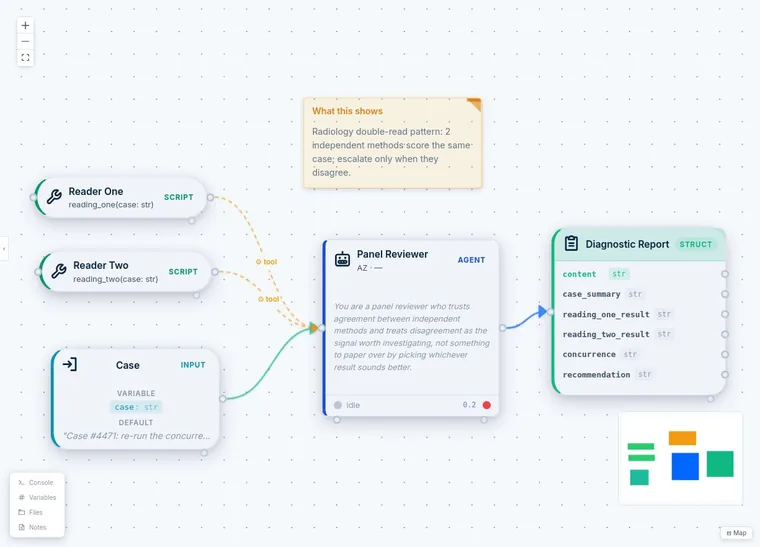
QMerse canvas: two reader scripts are tools of a Panel Reviewer agent, which takes a case and returns a structured diagnostic report with both readings and a recommendation.
Analysis · Demo

Double-Read Review

Escalate only when two independent methods disagree.

Status
Demo
Task & input
A case to assess.
QMerse performs
Two independent methods score the case and a Panel Reviewer agent compares them.
You review
Cases where the two methods disagree, which are escalated.
Output
A diagnostic report with both readings and a recommendation.

Escalate only when methods disagree. Two independent methods score the same case; the panel reviewer treats disagreement as the signal worth investigating.

Flow: Reader one + Reader two (tools) · Case → Panel Reviewer → Diagnostic report.

Orchestration · Concept

Industrial Flexibility Scheduling

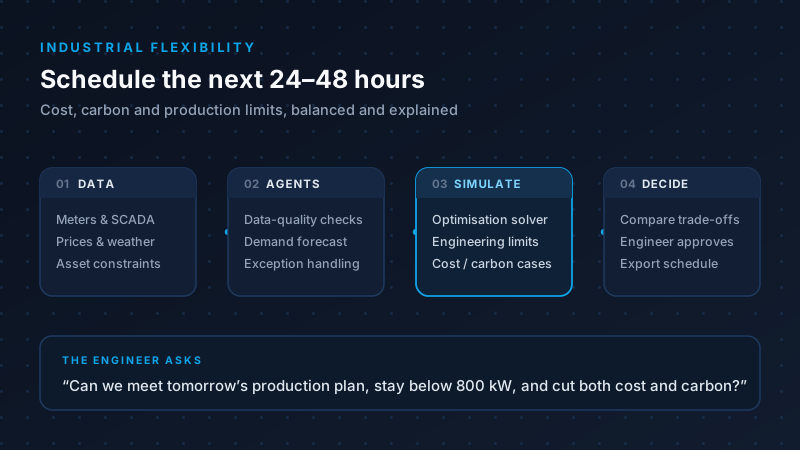
Schedule batteries, heat pumps and flexible production over 24–48 hours, balancing cost, carbon and limits.

Status
Concept
Task & input
Site data (meters and SCADA, asset constraints, the production plan) with price and weather forecasts.
QMerse performs
Agents check data quality, forecast demand and run scenarios; a deterministic solver calculates the schedule within engineering limits.
You review
A named engineer approves the schedule before anything is exported.
Output
A schedule with its cost and carbon trade-offs and a record of why.

Industrial sites are being asked to electrify without breaking their production plan. The levers exist — battery storage, load shifting, interruptible loads, batch rescheduling, onsite solar — but they sit across separate systems, and cost, carbon and output constraints all pull in different directions. Deciding what to run tomorrow is a judgement call made under time pressure.

The workflow. Connect site data (meters and SCADA, asset constraints, the production plan) alongside price and weather forecasts. Agents handle the messy part — data-quality checks, demand forecasting, orchestrating scenarios and catching exceptions. A deterministic optimisation solver then calculates the actual schedule against real engineering limits, and cost-first, carbon-first and balanced cases are compared side by side with their uncertainty.

The division of labour is the point. The AI coordinates data, tools and explanations. It does not invent the answer: the solver enforces the engineering constraints, and a named engineer approves the schedule before anything is exported. Every recommendation carries its inputs and assumptions, so it can be checked rather than trusted.

An engineer asks: “Can we meet tomorrow’s production plan, stay below 800 kW, and cut both cost and carbon?” — and gets a schedule, the trade-offs behind it, and a record of why.

Worked concept. This describes a workflow design, not a deployed installation — a bounded prototype can validate the data-to-decision loop on synthetic or anonymised site data, with no autonomous control, before anything is connected to a plant.

Have a workflow in mind?

Try it in the online sandbox, or discuss deploying QMerse within your organisation.