
Explore the sandbox. Discuss your deployment.

Use the online sandbox to explore QMerse and test workflow ideas. For on-premises deployment, contact us to discuss your organisation’s requirements and receive a tailored proposal.

Deployment scope depends on your infrastructure, users, workloads, model configuration, integrations and support requirements.

The two options

Online sandbox

Freefree sandbox access

To explore the visual builder, try example workflows and test your ideas

  • The visual canvas — agents, tools, Python and APIs
  • US$5 of model credit, to use within two weeks of creating your account
  • Bring your own model API key
  • Scheduled runs and webhooks
  • Approval steps that pause a run for review
  • Inspect workflow inputs, outputs, tool calls and available execution logs
  • Interactive charts and visualisations
  • Public templates
  • Community support

A shared environment with usage and capability limits: 5 MB per file upload, the built-in Python libraries and shared compute.
On-premises deployment

Proposaltailored to your requirements

For organisations that need QMerse running within their own infrastructure

  • The same builder and features as the sandbox
  • Runs within your organisation’s infrastructure
  • Supported cloud and local models, configured for your environment
  • Compute sized to your workloads
  • Custom integrations scoped as part of your proposal
  • Your own Python packages, not just the built-in libraries
  • Larger file uploads and execution limits
  • Shared workspaces and collaboration
  • Support agreed with you

An annual licence per production installation, sized to your number of users. Delivered by us or by a QMerse domain partner.

Not sure which you need? Tick what your workflow needs.

Fits Online sandbox Nothing ticked yet: start by exploring in the sandbox. Tick what your workflow needs.

Five costs, stated separately.

An on-premises proposal keeps each part of the cost on its own line, so you can see what you are paying for and who it is paid to. If a QMerse domain partner delivers your deployment, you contract with the partner directly.

  1. 01

    Platform licensing

    An annual licence for each production installation of QMerse within your infrastructure, sized to your number of users.

  2. 02

    Implementation

    Installation, configuration and any custom integrations, scoped as part of your proposal.

  3. 03

    Infrastructure

    The servers or cloud capacity QMerse runs on. These sit within your organisation, so you provision and pay for them directly.

  4. 04

    Model usage

    Inference from the cloud or local models you choose, billed by your model provider or run on your own hardware. We do not mark up inference.

  5. 05

    Support

    The level of support, response times and contact you need, agreed with you.

The sandbox’s limits.

The sandbox is a shared environment with usage and capability limits. These are the ones that most often decide when to discuss a deployment.

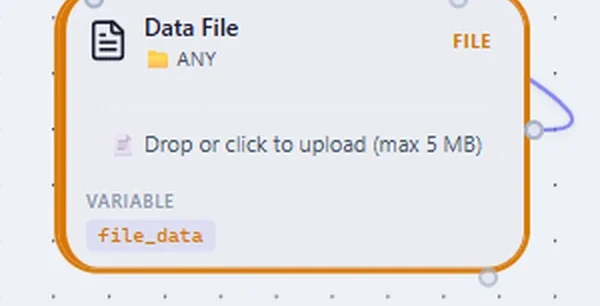
A Data File node on the QMerse canvas reading: Drop or click to upload (max 5 MB).

5 MB per file

Individual file uploads are capped at 5 MB in the sandbox. In an on-premises deployment, upload limits are set to your workloads.

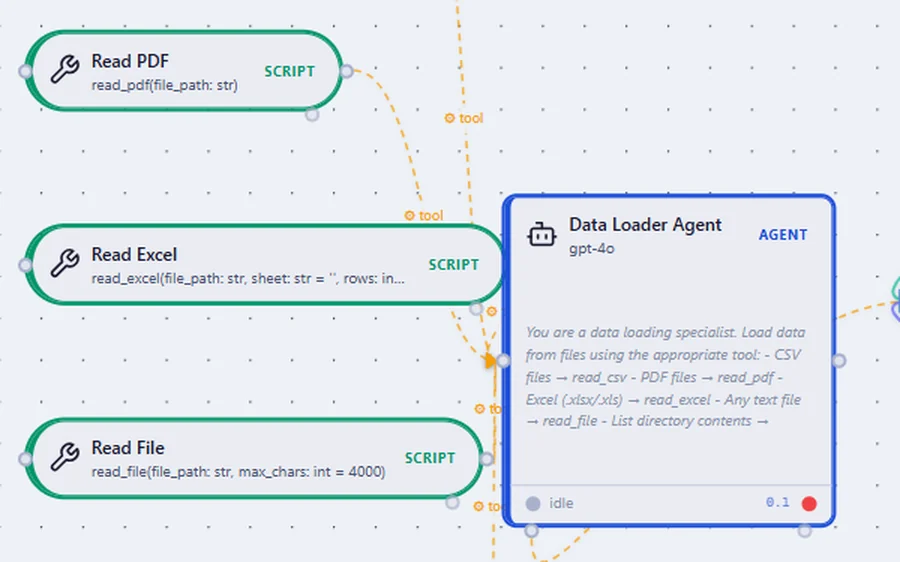
Python script nodes on the QMerse canvas, Read PDF, Read Excel and Read File, each wired to a Data Loader Agent as a tool.

The built-in Python libraries

The sandbox gives you the built-in Python libraries rather than arbitrary packages. An on-premises deployment runs your own packages.

Shared compute

In the sandbox, workflows run on compute shared with other users. In an on-premises deployment, compute is sized to your workloads within your own infrastructure.

The online sandbox and an on-premises deployment, side by side

CapabilityOnline sandbox Free accessOn-premises Proposal
Visual canvas, agents, Python and APIs, You ticked thisIncludedIncluded
Bring your own model API key, You ticked thisIncludedIncluded
Scheduled runs and webhooks, You ticked thisIncludedIncluded
Approval steps, You ticked thisIncludedIncluded
Where it runs, You ticked thisShared, hosted by QMerseYour organisation’s infrastructure
Models, You ticked thisSupported cloud models: US$5 credit for two weeks, then your own keySupported cloud and local models
File upload size, You ticked this5 MBSet to your workloads
Python libraries, You ticked thisBuilt-in setYour own packages
Compute, You ticked thisSharedSized to your workloads
Custom integrations, You ticked thisNot includedScoped as part of your proposal
Shared workspaces & collaboration, You ticked thisNot includedIncluded
Support, You ticked thisCommunityAgreed with you

Questions about the sandbox and deployment

What is the online sandbox for?

Exploring QMerse: the visual builder, the example workflows and your own ideas, before you discuss a deployment. Sandbox access is free and includes US$5 of model credit for your first two weeks. It is a shared environment with usage and capability limits, so it is not where production workloads or confidential data should run.

What are the sandbox’s limits?

The ones that matter most: individual file uploads are capped at 5 MB, you have the built-in Python libraries rather than arbitrary packages, and workflows run on compute shared with other users.

Which models can I use in the sandbox?

Supported cloud models. A new sandbox account includes US$5 of model credit, to use within two weeks of creating it. After that, or once the credit is used, connect a supported model provider, such as OpenAI, Anthropic or Azure, with your own API key. You then control which model runs and what it costs, and we do not mark up inference.

When should we discuss an on-premises deployment?

When a workflow needs to run within your own infrastructure, or needs more than the sandbox offers: larger files, your own Python packages, compute sized to your workloads, local models, integrations with your systems, or shared workspaces for your team.

How is an on-premises deployment priced?

Through a tailored proposal, built around an annual platform licence for each production installation, sized to your number of users. Its scope depends on your infrastructure, users, workloads, model configuration, integrations and support requirements, and it states platform licensing, implementation, infrastructure, model usage and support separately.

Why is there no self-serve paid plan?

Because what an organisation needs from a deployment — where it runs, which models, which integrations, what support — is specified rather than bought off a page. A conversation gets it scoped properly instead of a plan you have to work around.

Bringing your industry’s tools to QMerse?

Engineering firms and domain specialists can join the domain partner programme: resell QMerse platform licences, license your own domain add-ons, and lead on-premises delivery for your clients.

Explore what you can build with QMerse.

Test your ideas in the online sandbox, then talk to us about deploying QMerse within your organisation.

Would rather someone built it for you?Work with Zapwiser ↗